

DSBOARD-ORNX Overview and Connector Definitions
WHAT YOU WILL LEARN?
1- The basic perspective over DSBOARD-ORNX
2- The definitions of buttons
3- The definitions of each connector
ENVIRONMENT
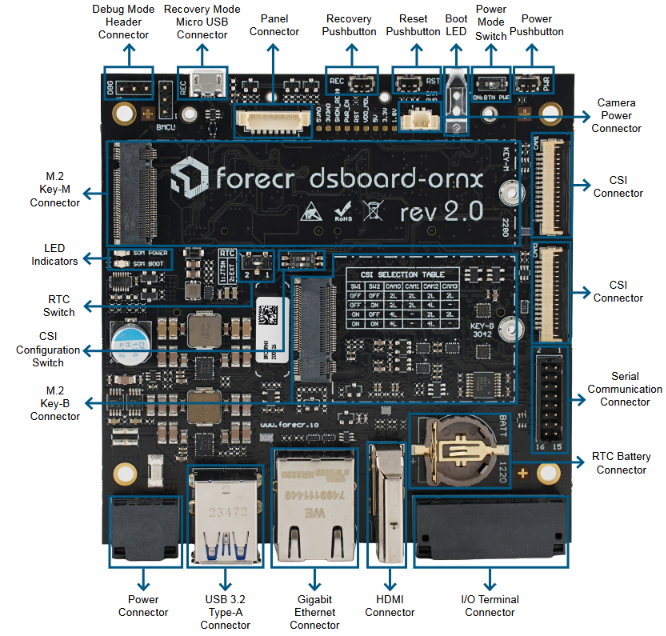
Forecr’s DSBOARD-ORNX is industrial carrier board based on Nvidia Jetson Orin NX and Orin Nano processor modules for edge analytics. It is compatible with multi stream deep learning applications.
TECHNICAL SPECIFICATIONS
Supported Modules
NVIDIA Jetson Orin Nano 4GB / 8GB
NVIDIA Jetson Orin NX 8GB / 16GB
Memory
4 GB 64-bit LPDDR5 / 8 GB 128 bit LPDDR5
8 GB 128-bit LPDDR5 / 16 GB 128 bit LPDDR5
Graphics Interfaces
1x HDMI 2.0 (max resolution 3840x2160)
Interfaces
1x Gigabit Ethernet
2x USB 3.2 Type-A
1x CAN-FD
1x RS232
1x RS422
1x microUSB 2.0 (Recovery)
2x Digital Input (12-24V)
2x Digital Output (up to 24V)
2x CSI 4-Lane or 4x CSI 2-Lane
Wireless Communication
WIFI/LTE/5G/Bluetooth Connectivity by extension sockets
Power Supply
9-32 VDC
Extension Sockets
M.2 Key-B 3042 (USB3.0, USB2.0)
M.2 Key-E 2230 (PCIe x1, USB2.0)
1x nanoSIM
FAN Header (5V, PWM, TACH)
Serial Communication Header (1x SPI, 1x I2S, 1x I2C)
Mass Storage 1x M.2 Key-M 2280 (PCIe x4 Gen4)
1x M.2 Key-M 2230 (PCIe x1 Gen4)
Ambient Conditions
-40°C ... +85°C
Form Factor / Dimensions
100 mm x 100 mm, 82.8 gr
Operating Systems
Ubuntu Linux 20.04 / 22.04 / 24.04
JetPack Support
JetPack 5.x / 6.x / 7.2+
The Definitions of Buttons
DSBOARD-ORNX Power Button
The DSBOARD-ORNX implements a power button for energize the platform. It is located on the front side of the board.

DSBOARD-ORNX Recovery Pushbutton
The DSBOARD-ORNX implements a recovery pushbutton. Recovery button should be pressed with reset button at the same time. After released reset button, recovery button should be pressed a little bit more (min. 250 ms). It is located on the front side of the board.

DSBOARD-ORNX Reset Pushbutton
The DSBOARD-ORNX implements a reset button.

The Definition of Each Connector
DSBOARD-ORNX Power Connector
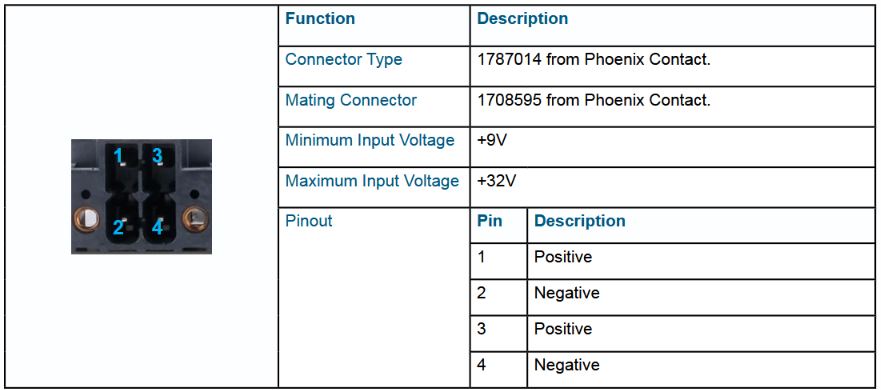
The DSBOARD-ORNX implements 4-Pin Power Terminal Connector that accepts +9V to +32V DC power. The mating connector is "1708595". The first and the third pins are positive , second and fourth pins are negative. The power connector is located on the rear side of the board.
DSBOARD-ORNX Power Mode Switch
The DSBOARD-ORNX implements power mode switch. It enables or disables auto power-on mode.

DSBOARD-ORNX SIM Card Connector
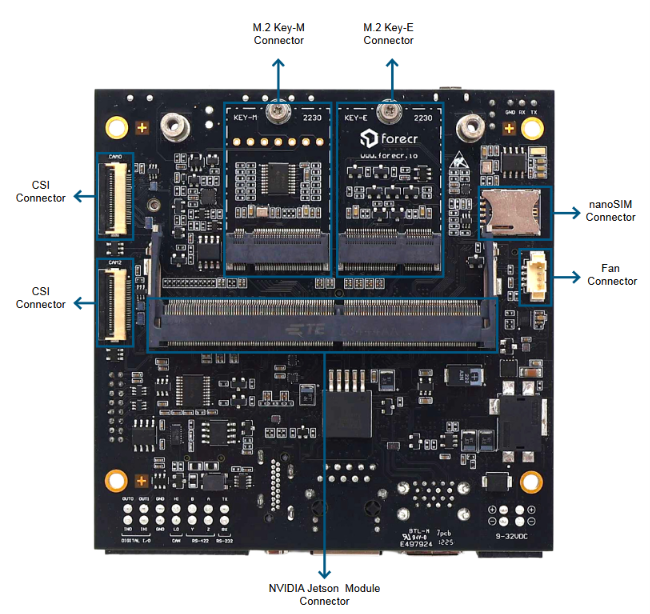
The DSBOARD-ORNX implements a nano SIM card connector. It is located on the bottom side of the board.

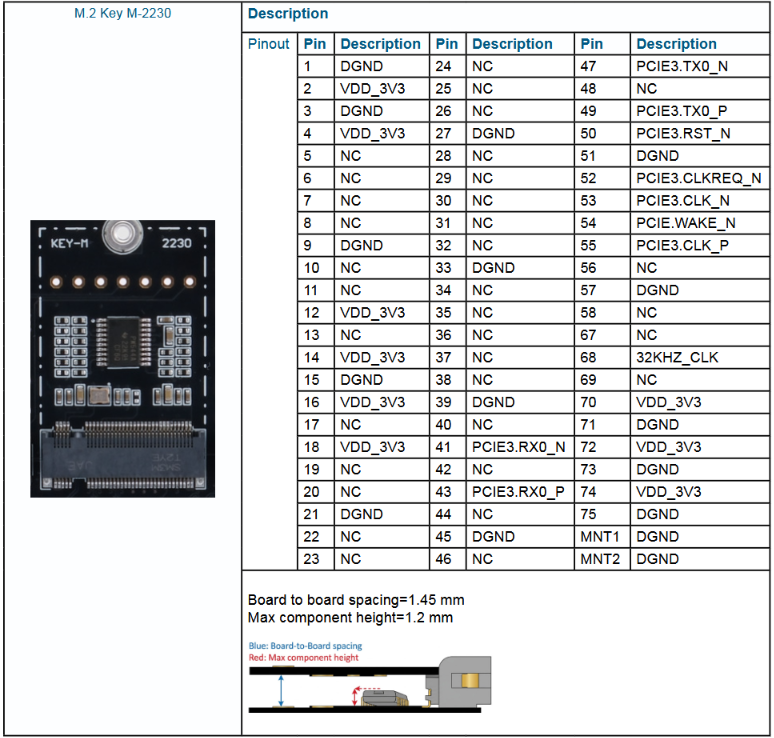
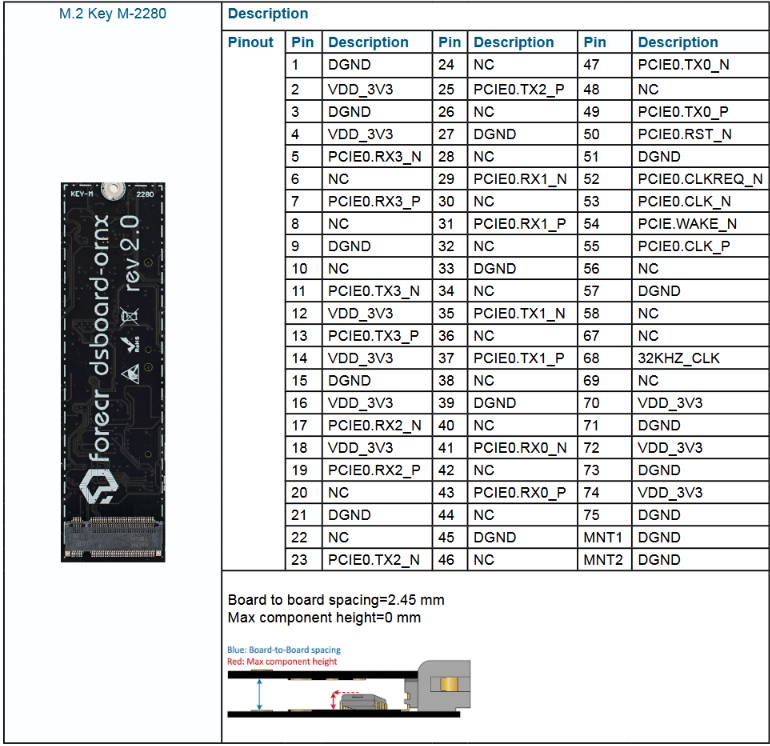
DSBOARD-ORNX M.2 Key-M Connectors
TheDSBOARD-ORNX implements two M.2 M-Key Connector(1x 2230, 1x 2280) forsuitable modules. M.2 2280 slot is located on front side and M.2 2230slot is located on bottom side of the board.
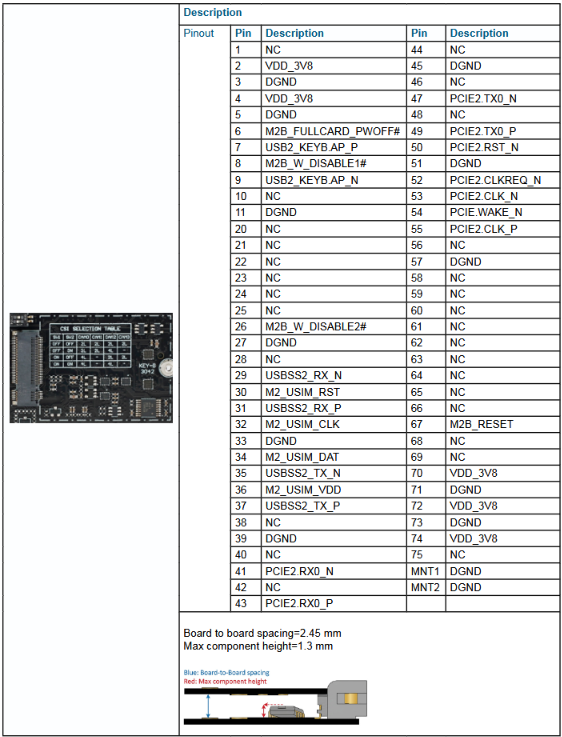
DSBOARD-ORNX M.2 Key-B Connector
TheDSBOARD-ORNX implements a M.2 Key-B Connector for suitable modules. The M.2 Key-B connector is located on the front side of the board.
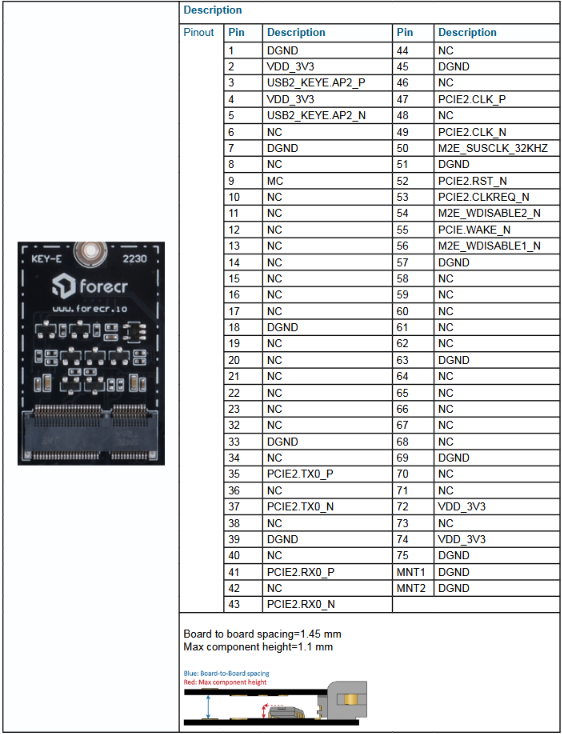
DSBOARD-ORNX M.2 Key-E Connector
TheDSBOARD-ORNX implements a M.2 E-Key Connector for suitable modules. Thisconnector is located on the bottom side of the board.
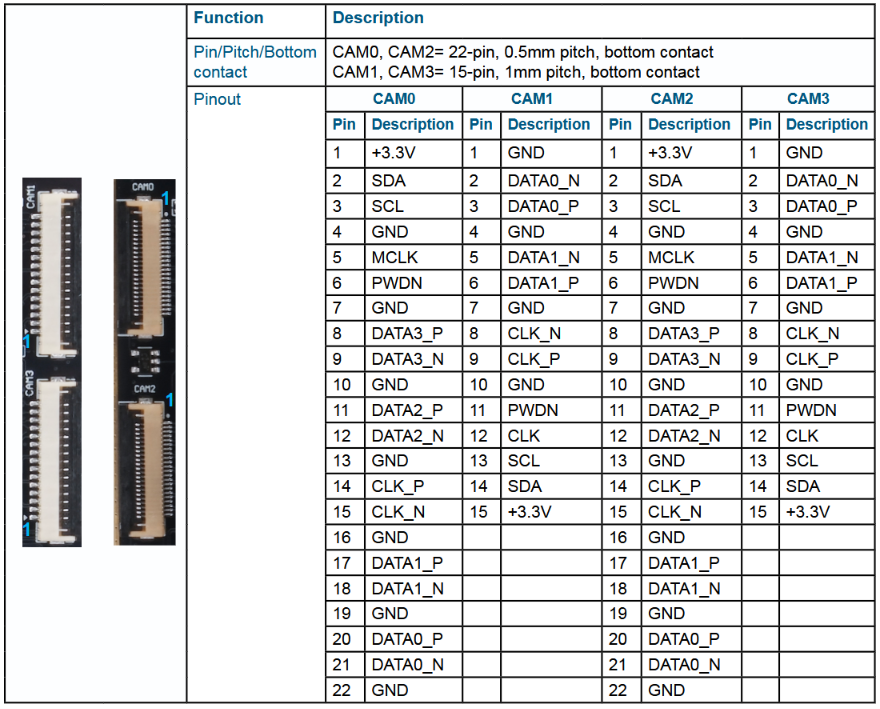
DSBOARD-ORNX CSI Connectors
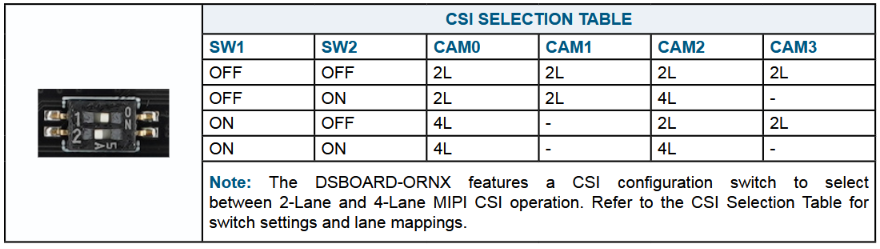
The DSBOARD-ORNX implements 4 CSI connectors. 2 at front (CAM1, CAM3 - 686115148922 from Würth Elektronik), 2 at bottom (CAM0, CAM2 - 687122149022 from Würth Elektronik). The bottom connectors can be used as 4-lane and 2-lane. The front connectors can be used as just 2-lane. The connector’s possible connections shown by below.
DSBOARD-ORNX Camera Power Connector
The DSBOARD-ORNX implements a camera power connector.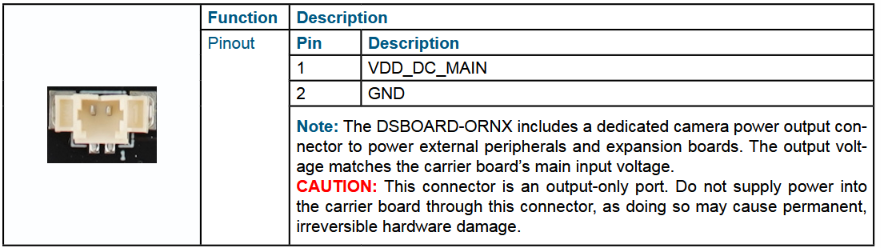
DSBOARD-ORNX I/O Terminal Connector
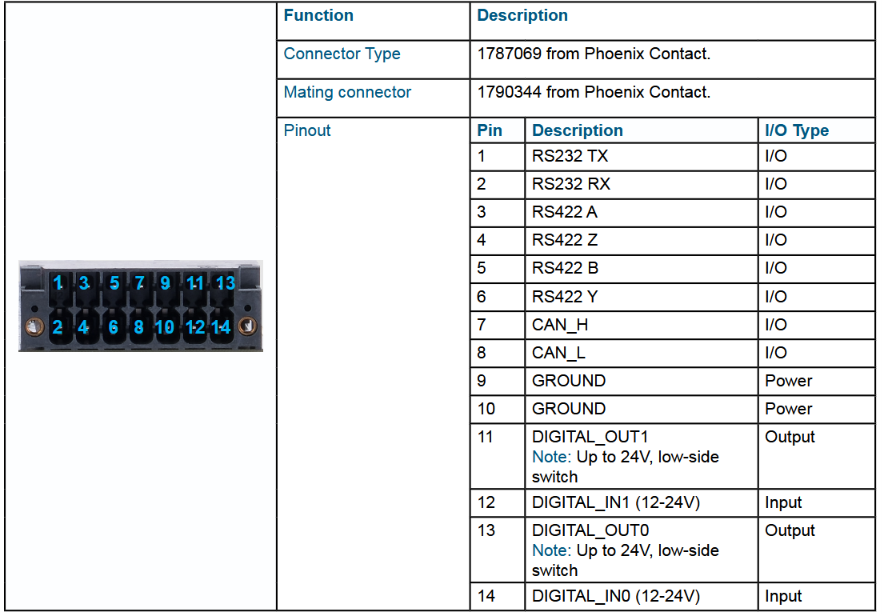
The DSBOARD-ORNX implements 14 pins GPIO Expansion connector which has 3 digital output pins, 2 digital input pins, RS232-RS422 & CANBus pins. The mating connector is “1790344” produced by Phoenix Contact.
DSBOARD-ORNX Serial Communication Connector
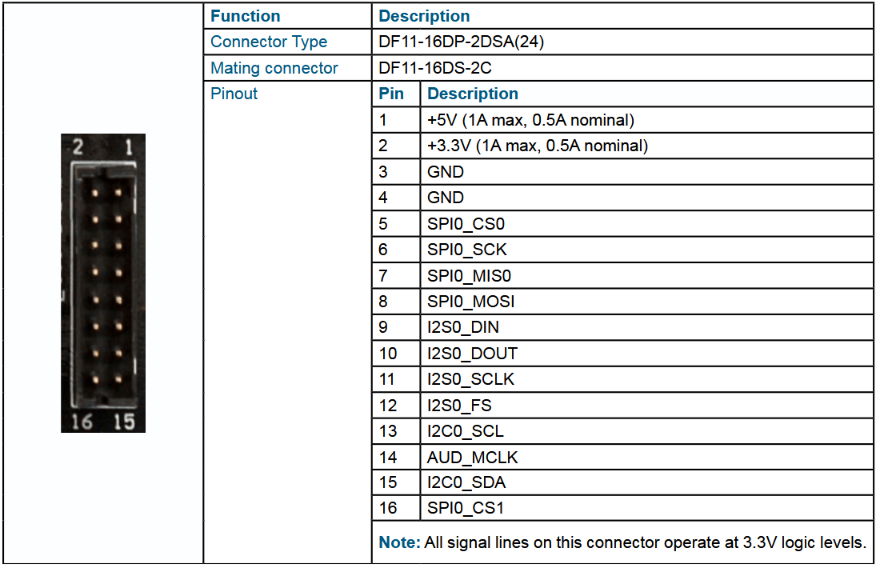
The DSBOARD-ORNX implements 16 pins Serial Communication connector which has SPI, I2C and I2S standard pins. All signals are the 3.3V voltage level. The connector type is "DF11-16DP-2DSA(24)" . The mating connector is "DF11-16DS-2C". The small arrow represent the first pin and the opposite of this pin is second pin . It is located on the front side of the board.
DSBOARD-ORNX Panel Connector
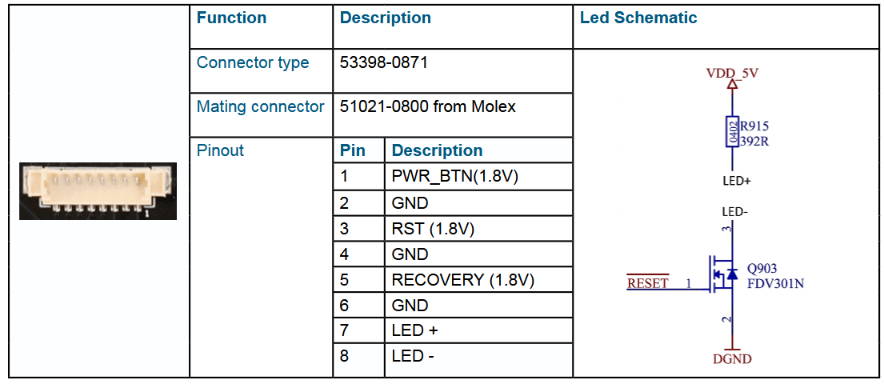
The power, recovery & reset button's signals located at the panel connector. The connector type is "53398-0871". The mating connector is "51021-0800" produced by Molex.
DSBOARD-ORNX RTC Battery Connector
The DSBOARD-ORNX implements a RTC battery holder. The connector is suitable for CR1220 batteries. The connector is located on front side of the board.

DSBOARD-ORNX RTC Switch
The DSBOARD-ORNX implements a RTC switch. It allows selecting Jetson module's internal RTC and low-power external I2C RTC.

DSBOARD-ORNX HDMI Connector
The NVIDIA® Jetson Orin NX module will output video via the DSBOARD-ORNX vertical HDMI connector that is HDMI 2.0 capable. It is located on the rear side of the board.

DSBOARD-ORNX USB 3.2 Type-A Connector
The DSBOARD-ORNX incorporates 2 USB 3.2 Type-A connectors with a 1.5A current limit per connector. The USB connector is located on the rear side of the board.

DSBOARD-ORNX 10/100/1000 Ethernet Connector
The DSBOARD-ORNX implements RJ-45 ethernet connector for internet communication. RJ-45 connector is connected directly to the NVIDIA Jetson module. The ethernet connector is located on the rear side of the board.

DSBOARD-ORNX Fan Connector
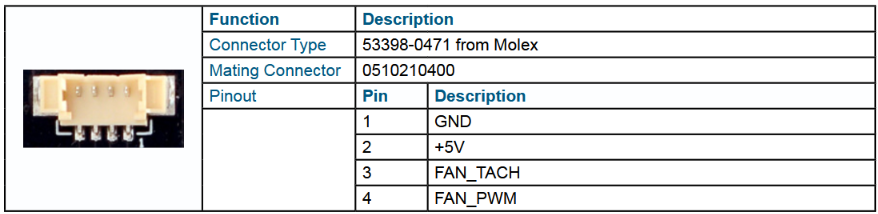
The DSBOARD-ORNX implements a fan connector as 53398-0471 from Molex. The mating connector is 0510210400. It is located on the bottom side of the board.
DSBOARD-ORNX Recovery Mode Micro USB Connector
The DSBOARD-ORNX implements a Micro USB connector to allow to install or upgrade the operating system. It is located on the front side of the board.

DSBOARD-ORNX Debug Mode Header Connector
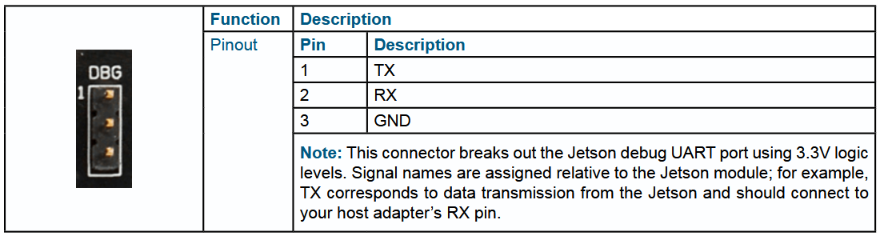
The DSBOARD-ORNX implements a header connector to access the module by using TTL connection. It is located on the front side of the board.
Thank you for reading our blog post.

